 Image via CrunchBaseGoogle представила небольшую утилиту, которая служит для синхронизации событий из календаря Google с календарем Microsoft Outlook.
Синхронизировать можно как в двух направлениях, так и в каком-то одном (настраивается опционально). Так же на данный момент единственным недостатком является то, что вы можете синхронизировать только основной календарь Google (но в будущем обещают исправить данный недостаток).

Инструкции по установке здесь.
Источник: Google Operating System (англ.)
_______________________________________________________________
To set up Google Calendar Sync:
- Make sure you're using a supported operating system and Outlook version.
- Download Google Calendar Sync (version 0.9.3.6) at http://dl.google.com/googlecalendarsync/GoogleCalendarSync_Installer.exe
- Once a dialog box appears, click Save File. The downloaded file should open automatically. If it doesn't, manually open it from your browser's download window.
- Click OK to confirm that you're aware this is an executable file.
- Read through the Google Calendar Sync Terms of Service, and click I Agree.
- Follow through the Installation Options and click Install to finish the set-up process.
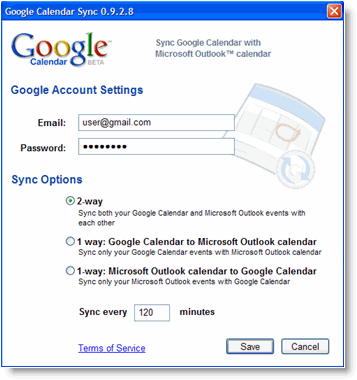
In the Settings window, enter your email address and password and select the Sync Option you prefer. Read about each Sync Option.

